The Terrifying Moment I Thought I Lost Everything
Your phone buzzes at 2 AM. It is a text message from your bank about a massive withdrawal halfway across the world. Panic sets in, right? We all like to think our digital lives are too boring for hackers to care about, but trust me, they want your data just as much as your money. Let's fix your online security right now, using plain English and zero confusing tech words.
My primary email password was suddenly incorrect, and instant panic set in. I frantically tried to reset it, only to find the recovery phone number was changed.
My stomach dropped as I realized my bank accounts, social media, and personal photos could potentially be exposed.
That deep, sinking feeling is something no one wants to experience. Every day, regular people wake up to find their digital lives affected by invisible attackers. You might think you are safe because you do not have millions of dollars in the bank.
However, scammers do not just want your money. They also want your identity. They can hijack social media profiles and use trusted accounts to scam friends and family members.
Imagine having to explain that strange messages asking for money actually came from your hacked profile. Think about the family photos, important documents, and private conversations stored inside an account you can no longer access.
This constant threat can destroy your mental peace. We are always second-guessing emails, links, and text messages.
The good news is that you do not need to be a technology expert to build strong protection around your digital life.
What You Will Learn Today (The 30-Second Summary):
-
Why you need a "passphrase" instead of a normal password.
-
How an authenticator app easily beats standard text message codes.
-
The exact red flags to look for when you get an alarming email from your bank or Netflix.
-
Simple, free habits to lock hackers out of your personal life for good
Start Treating Your Passwords Like House Keys

Many people use simple passwords based on names, pets, birthdays, or common numbers because they are easy to remember.
The problem is that hackers know these patterns, too. Automated systems can test thousands of common words and password combinations quickly.
A stronger approach is to use a unique passphrase for every important account. A passphrase is a longer combination of words and characters that is easier for you to remember but much harder for automated systems to guess.
For example, a phrase such as "BlueCoffeeCupRunningFast!" is long and uses different types of characters.
Never reuse the same password across multiple websites. If one service suffers a data breach, attackers may try the stolen password on your email, banking, social media, and other accounts.
A password manager can make this much easier. It works like a secure digital vault where you can create, store, and autofill complex passwords. You only need to remember one strong master password.
The Magic Shield: Multi-Factor Authentication (MFA)
Imagine locking the front door of your house, but someone steals your key. The key alone still cannot open the door because another verification step is required.
That is essentially how Multi-Factor Authentication works.
Even if an attacker discovers your password, they may still be unable to access the account without the additional authentication method.
Whenever an important account supports MFA, consider enabling it.
There are several common authentication methods:
| Authentication Type | How Secure Is It? | Ease of Use |
|---|---|---|
| SMS Text Codes | Good (Better than nothing) | Very easy |
| Authenticator Apps | Excellent (Highly recommended) | Moderate |
| Physical Security Keys | Maximum Security | Requires hardware |
Authenticator apps are generally preferable to SMS when available because they generate verification codes directly on your device.
Watch this quick breakdown to understand how hackers operate and how you can protect yourself:
Quick Truth Check: SMS vs Authenticator Apps
You might think getting a text message with a code is completely safe. But here is the scary truth: hackers can easily hijack your phone number using a trick called SIM swapping.
-
The bad habit: Using SMS texts for your bank login codes.
-
The smart move: Downloading a free app like Google Authenticator or Authy. The codes stay safe right on your physical phone, far away from any network hackers.
Microsoft has reported that enabling MFA can block 99.9% of automated attacks, making it one of the most valuable security measures for online accounts.
Spotting the Invisible Traps (Phishing Scams)
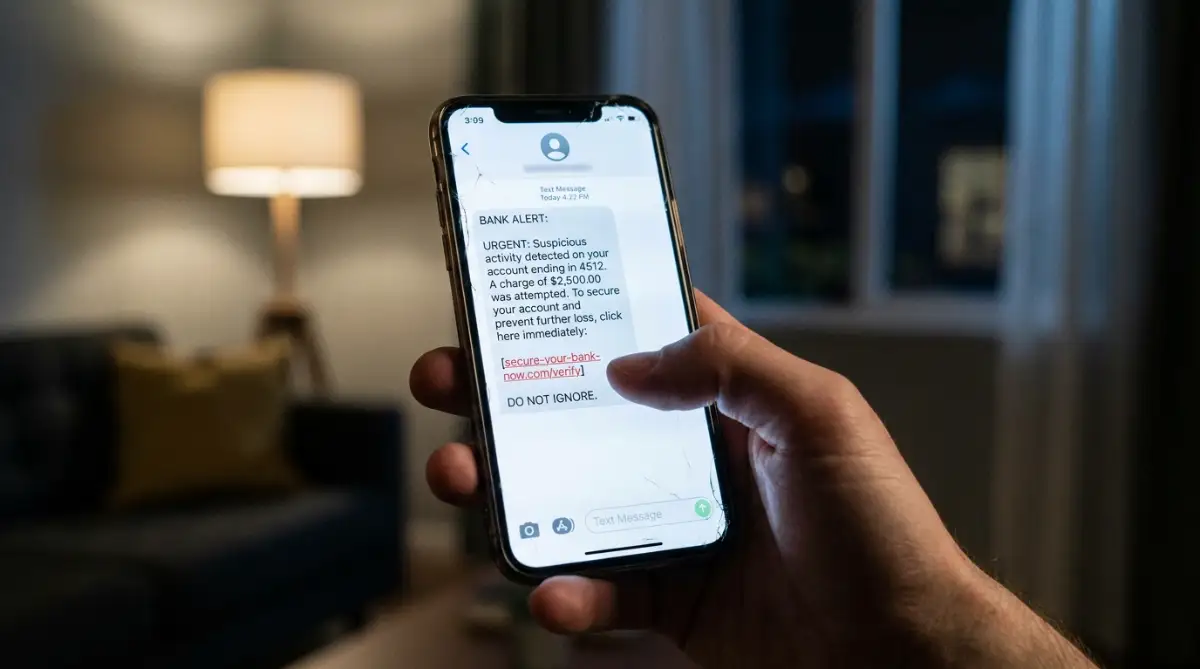
Scammers have become much more sophisticated. Instead of obvious messages from imaginary princes, modern phishing attempts can look like they come from familiar companies such as Netflix, PayPal, or your bank.
A message may claim that your account has been suspended or that an unusual payment was detected. The goal is to create urgency so that you click a link and enter your information.
Always examine the sender's actual email address.
The displayed name might say "Amazon Support," while the actual address could be something like "support@amazon-update-info.com."
Never click an unexpected link in an alarming email. If you are concerned about an account, open a new browser tab and manually visit the official website.
Why Public Wi-Fi is a Hacker's Playground
Public Wi-Fi at coffee shops, airports, hotels, and other locations is convenient, but sensitive activities should be handled carefully on open networks.
When you connect to an unsecured network, other people on the same network may have opportunities to intercept or observe network traffic.
Avoid accessing highly sensitive accounts over unfamiliar public networks whenever possible.
If you must use public Wi-Fi, a Virtual Private Network (VPN) can help encrypt your internet traffic. Another simple option is to use your mobile data connection when checking sensitive information such as your bank account.
My Personal Travel Trick: Turn Off "Auto-Join"
If you travel often, go into your phone's Wi-Fi settings right now and turn off "Auto-Join". This simple step stops your phone from silently connecting to a fake network named "Free Airport WiFi" while your phone is just sitting in your pocket.
Myth vs Reality: Exposing Common Security Beliefs
Myth: I am using an incognito or private browsing window, so hackers cannot track me.
Reality: Incognito mode mainly prevents your browser from saving local browsing history on your device. It does not make you invisible to websites, your internet provider, or other parties monitoring network traffic.
Myth: My computer is a Mac, so it cannot get viruses or be hacked.
Reality: Mac computers have strong built-in protections, but they are not immune to phishing, malicious software, or targeted attacks.
Keeping Your Digital Doors Constantly Updated
Software updates can be annoying, especially when they appear while you are busy.
However, security updates are often released to fix vulnerabilities that could otherwise be exploited by attackers.
When a vulnerability becomes publicly known, attackers may actively search for devices that have not installed the security patch.
Turn on automatic updates for your phone, computer, operating system, and applications whenever possible.
You should also regularly review active login sessions.
Check the "Devices" or "Where You Are Logged In" section of important services such as Google, Facebook, and Instagram.
If you see an old device you no longer own or an unfamiliar login, sign it out immediately.
By combining strong passwords, multi-factor authentication, careful browsing, and regular updates, you can create a much stronger layer of protection around your digital life.
Taking Your Digital Security to the Next Level
Sophisticated attackers may use different methods to target accounts and personal information. Building better privacy habits makes you a more difficult target.
The Genius Concept of Email Masking
Many websites ask for your email address before allowing you to use their services.
Your primary email account is especially important because it can often be used to reset passwords for other accounts.
Instead of giving your main email address to every website, consider using email aliases or masked addresses.
An email alias can forward messages to your main inbox without exposing your primary address. If a website is breached, you can disable the alias without affecting your main email account.
Many password managers and modern operating systems offer email masking features.
Investing in Physical Security Keys
For accounts that require the highest level of protection, hardware security keys are another option.
These are small physical devices that can be used during account authentication. Depending on the service, you may need to insert or tap the key when logging in.
This provides protection against many remote account takeover attempts because knowing the password alone is not enough.
According to the Cybersecurity and Infrastructure Security Agency (CISA), stronger authentication methods provide significant protection against account compromise.
Checking the Dark Web for Your Stolen Data
Large data breaches can expose email addresses, passwords, and other personal information.
It is useful to know whether your email address has appeared in known breaches so you can take action.
You can use trusted services such as Have I Been Pwned to check whether your email address appears in known data breaches.
If your information has been exposed, change the affected password immediately. If you reused that password elsewhere, change it there as well.
Sometimes, ignoring these warnings can be the real reason you keep facing the same problems with repeated login attempts.
The Hidden Danger of SIM Swapping
SIM swapping is another technique attackers can use to take control of a phone number.
An attacker may contact a mobile provider while pretending to be the account owner. If the attacker successfully convinces the provider to transfer the number to another SIM card, the victim's phone may suddenly lose service.
The attacker could then receive SMS messages, including certain account verification codes.
To reduce this risk, contact your mobile carrier and ask about adding a security PIN, account password, or port freeze to your account.
![Image Here]
The Silent Blunders That Will Destroy Your Privacy
Many security problems come from small habits that appear convenient.
People sometimes lose access to accounts or expose private information because they reuse passwords, share personal details, ignore permissions, or trust unexpected messages.
Let us look at some common mistakes.
The "Base Password" Illusion
Using one main password and changing only the final number is not a safe strategy.
For example, someone might use "Sunshine21" for one account and "Sunshine22" for another.
Attackers can automatically test these predictable variations. If they obtain one password, they may attempt similar versions against other accounts.
Use completely different passwords for important services.
If you struggle with finding practical solutions to repeating issues such as password fatigue, use a dedicated password manager.
Giving Away Security Answers on Social Media
Social media quizzes may ask questions such as your first pet's name, childhood street, or other personal information.
These details can sometimes resemble answers used for account recovery questions.
Avoid sharing sensitive personal information publicly.
The Federal Trade Commission (FTC) warns consumers about the risks of oversharing personal details online.
For security questions, consider using answers that are not publicly connected to you. For example, if a service asks for your mother's maiden name, you could use a random answer that you can securely remember.
Ignoring the Permissions on Your Smartphone Apps
Many applications request access to your microphone, camera, location, contacts, or files.
Do not automatically approve every permission request.
Review application permissions regularly and ask whether each permission is actually necessary for the app's function.
You should also delete applications that you no longer use. This can help you manage digital storage safely while reducing the number of applications that have access to your device.
If you want to free up space on your phone safely, start by removing applications you no longer need.
Trusting Unexpected Text Messages (Smishing)
Text messages can also be used for phishing attacks.
A scammer might send a message claiming that a package could not be delivered and ask you to pay a small redelivery fee.
The linked website may look similar to the official delivery company's website.
If you enter your card details or login information, the attacker may collect them.
This technique is known as SMS phishing, or "smishing."
Never click unexpected links from unknown numbers. Instead, visit the official website of the company directly and check your account or delivery status there.
Reusing Old Devices Without Wiping Them Properly
Old phones, laptops, tablets, and storage devices can contain sensitive information.
Simply deleting photos or logging out of an account may not completely remove the underlying data.
Before selling, donating, or giving away a device, perform a proper factory reset according to the manufacturer's instructions.
For computers containing highly sensitive information, secure wiping methods may provide additional protection.
If you are clearing out old data files, make sure important information has been backed up before permanently deleting it.
Building Your Unbreakable Digital Fortress Today
Protecting your online presence does not have to be overwhelming.
Start with the most important accounts first. Create unique passwords for your primary email and financial accounts, then enable multi-factor authentication.
Keep your devices and applications updated. Review account login sessions and remove unfamiliar devices.
Be cautious with unexpected emails and text messages. Avoid clicking suspicious links and visit official websites directly when you need to verify an account.
You also have the power to break out of negative cycles by replacing risky digital habits with consistent security practices.
The internet is an important tool for learning, communication, work, and everyday life. A few simple habits can significantly reduce your exposure to common online threats.
Things People Often Ask About Staying Safe Online
Can my phone be hacked through a simple text message?
Yes, but many attacks require you to interact with the message, such as clicking a malicious link, downloading harmful software, or entering your credentials into a fake website.
Delete suspicious texts without opening their links.
Is it safe to save my credit card on shopping websites?
It depends on the security practices of the service, but avoiding unnecessary storage of payment information can reduce your exposure if an account or website is compromised.
Secure payment methods such as Apple Pay, Google Pay, or virtual card numbers offered by some banks can provide additional protection.
Do I really need to pay for an expensive antivirus program?
For many everyday users, modern Windows and Mac systems include strong built-in security protections.
Keeping your system updated, using strong passwords, enabling MFA, and avoiding suspicious links are important security practices.
The Electronic Frontier Foundation (EFF) provides resources about protecting privacy and security online.
What should I immediately do if I click a bad link?
Do not panic.
If you downloaded a suspicious file, disconnect the device from the internet if appropriate and run a security scan using trusted security software.
If you entered a password into a suspicious website, change that password immediately from a safe device. If you reused that password elsewhere, change those accounts as well.
Does browsing in incognito mode protect me from hackers?
No.
Incognito or private browsing mainly prevents your browser from saving local browsing history on that device. It does not make your online activity completely private.
For better privacy on untrusted networks, use appropriate security measures such as encrypted connections and a reputable VPN.
Disclaimer: The information provided in this blog post is for educational and informational purposes only and does not constitute professional cybersecurity or financial advice. While we strive to provide accurate and up-to-date information, the digital security landscape changes rapidly. Always consult with a certified IT professional or cybersecurity expert before making significant changes to your network or device settings. We are not responsible for any data loss, financial damages, or security breaches resulting from the application of these general tips.